

Updated Mar-2024 Exam Engine for TDS-C01 Exam Free Demo & 365 Day Updates
Exam Passing Guarantee TDS-C01 Exam with Accurate Quastions!
Tableau TDS-C01 certification exam is a great way to showcase your skills in Tableau Desktop to potential employers. Employers are always looking for professionals who are proficient in using Tableau Desktop to generate insights and make data-driven decisions. Tableau Desktop Specialist certification not only validates your skills but also enhances your credibility as a professional. It demonstrates that you are committed to developing your skills and staying up-to-date with the latest trends and technologies in the industry.
NEW QUESTION # 95
True or False: Sets can be created on Measures
- A. True
- B. False
Answer: B
Explanation:
Sets are custom fields that are created within Tableau Desktop based on dimensions from your data source.
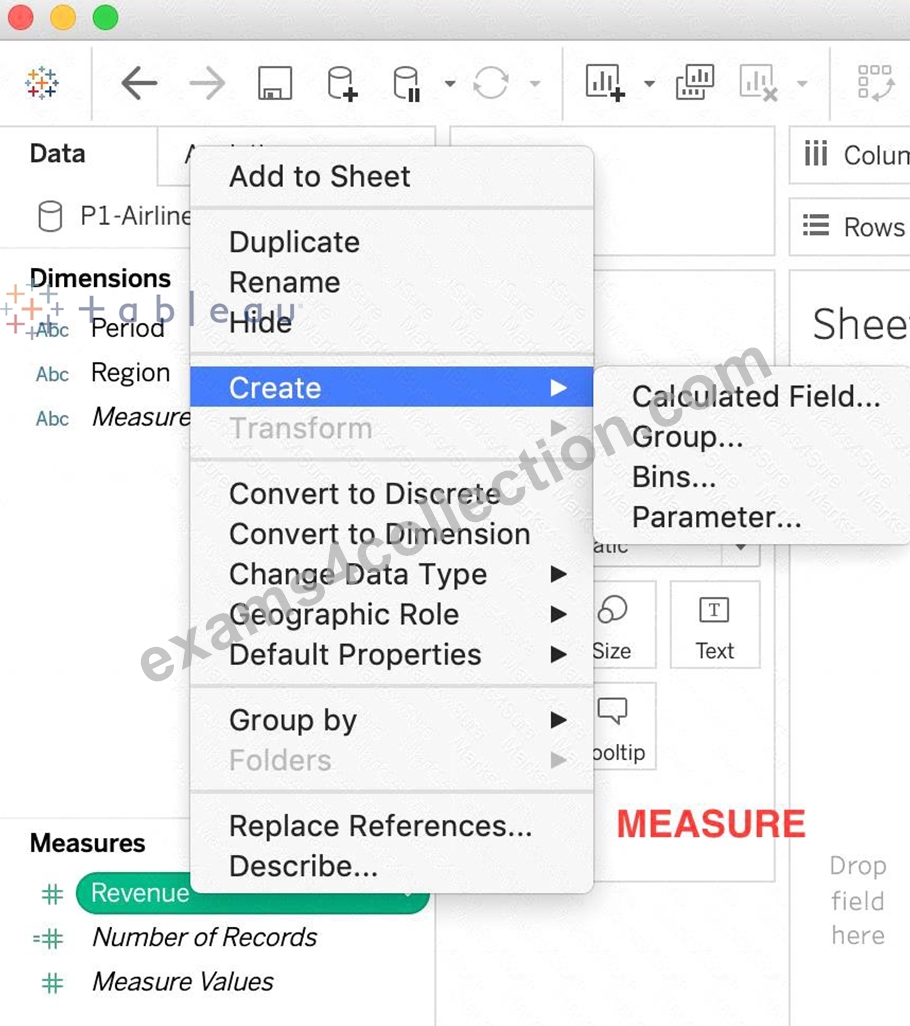
They are subsets of your data, which can be created manually or computed. Either dimensions or measures can be used to determine what is included or excluded from a set using conditional logic, but to CREATE a set we use dimensions.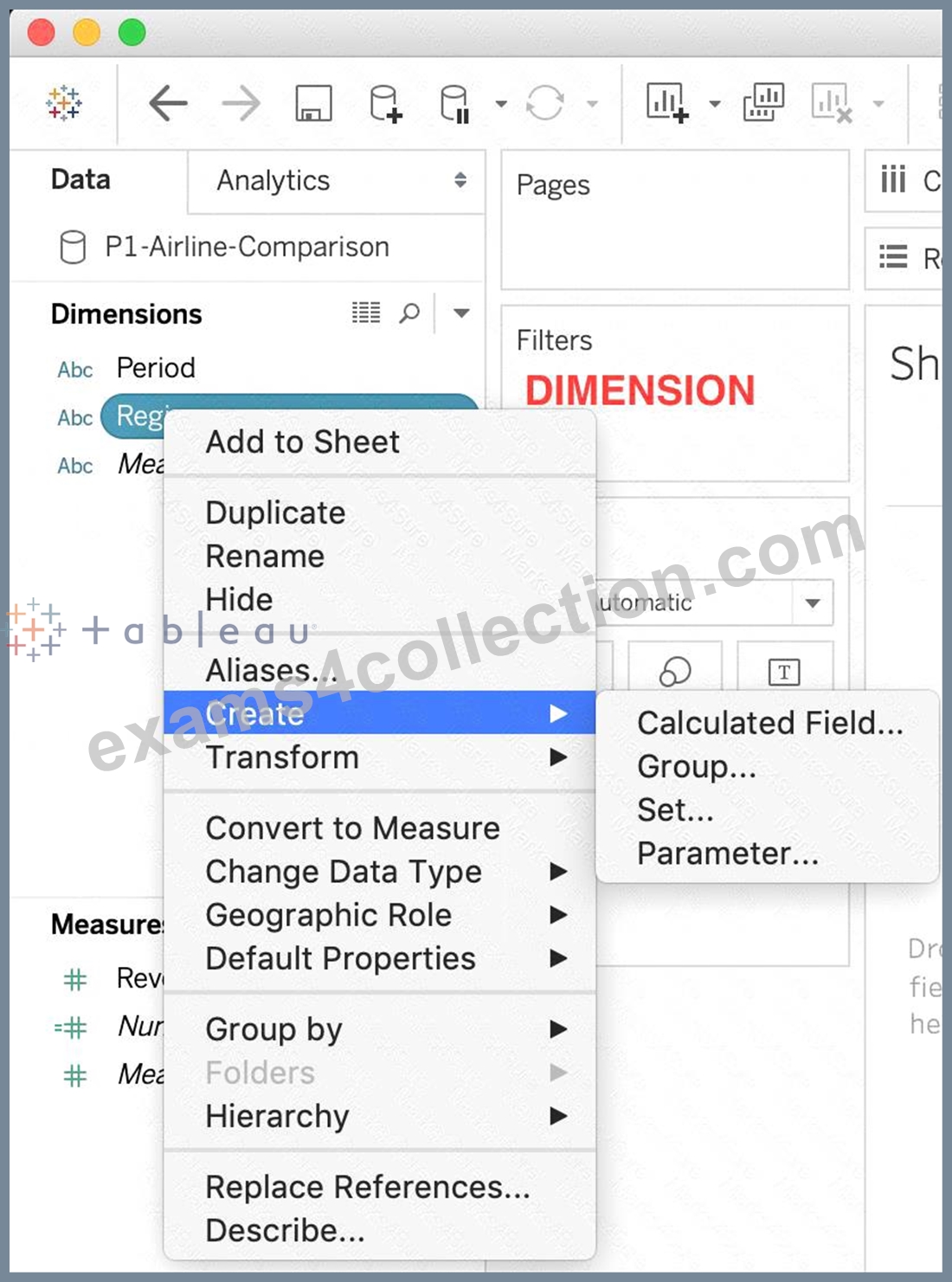
Reference : https://interworks.com/blog/rcurtis/2016/10/26/tableau-deep-dive-sets-introduction-sets/
NEW QUESTION # 96
Which of the following are valid ways to show Mark Labels in the visualisation?
- A. Click on Analysis in the Menu bar and choose Show Mark Labels
- B. Click on the Show mark labels icon in the Toolbar
- C. Click on Data in the Menu bar and Choose Show Mark Labels
- D. Drag the measure to the Text label in the Marks Card
Answer: A,B,D
Explanation:
Explanation
The following showcase how you can show mark labels. Using the Sample Superstore dataset:
1) Let's create a Bar chart showing the sales for each sub-category: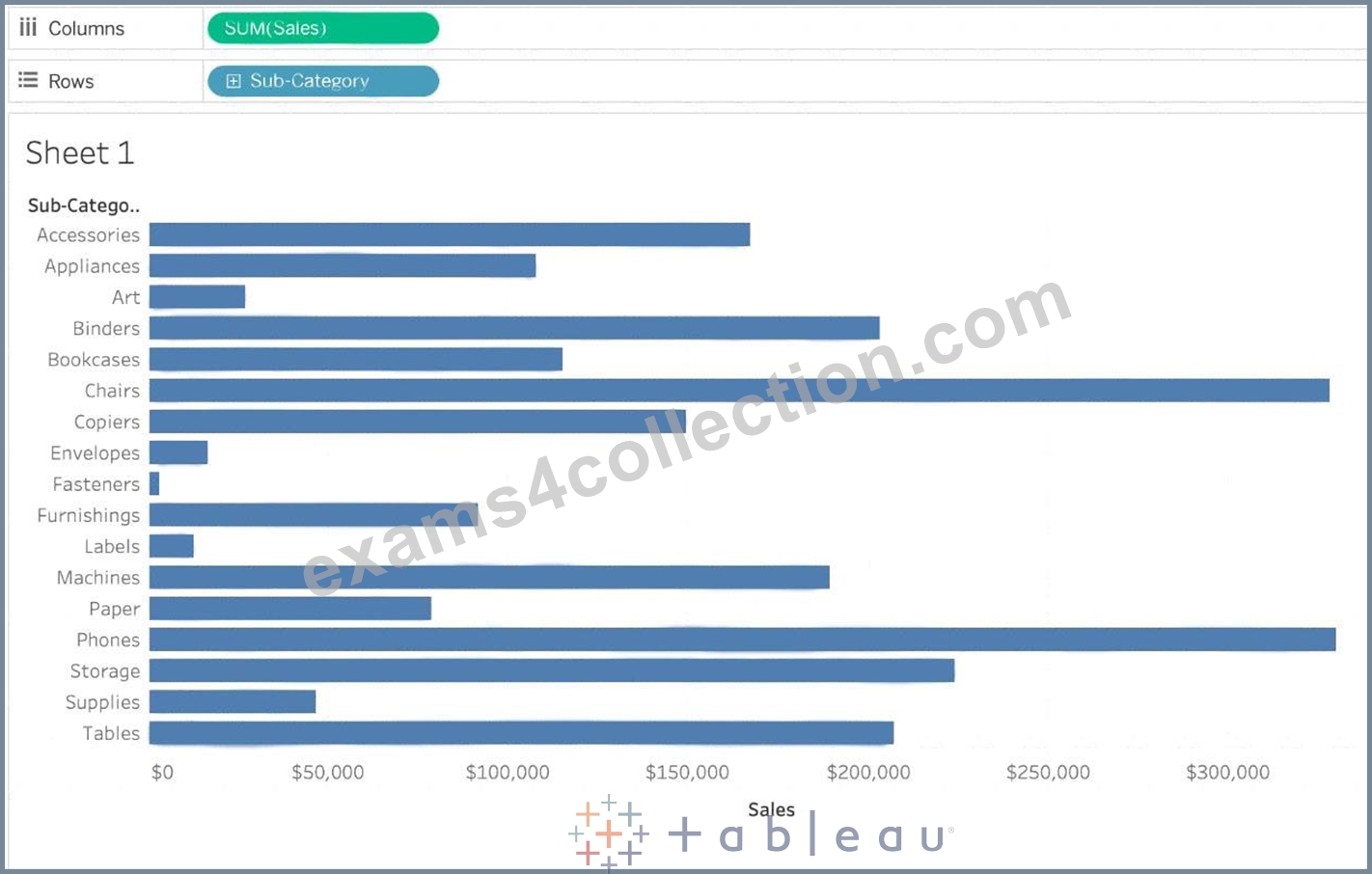
2) Now you can show labels by:
2.1) Click on Show Mark Labels Icon in the Toolbar ( easiest )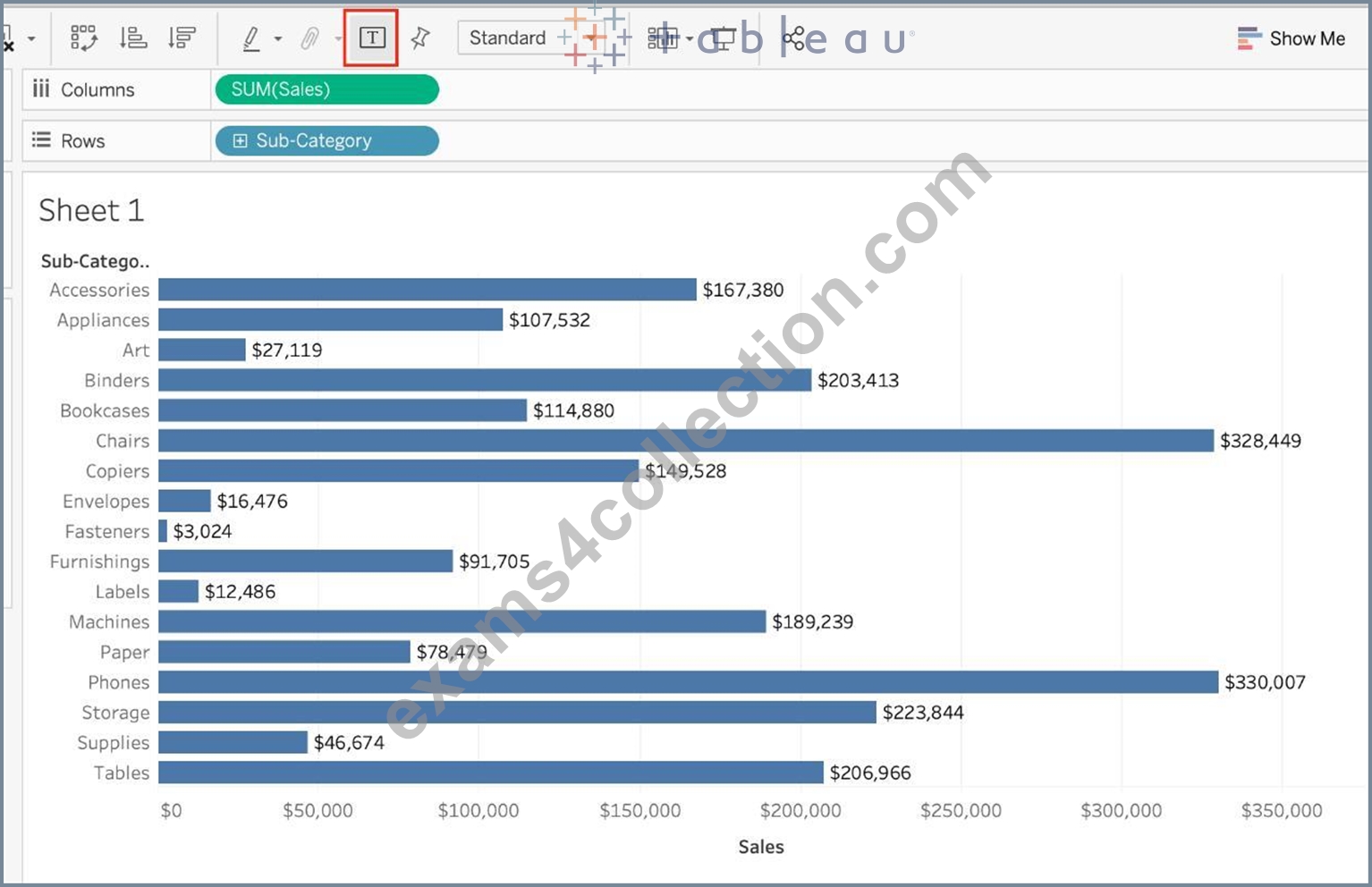
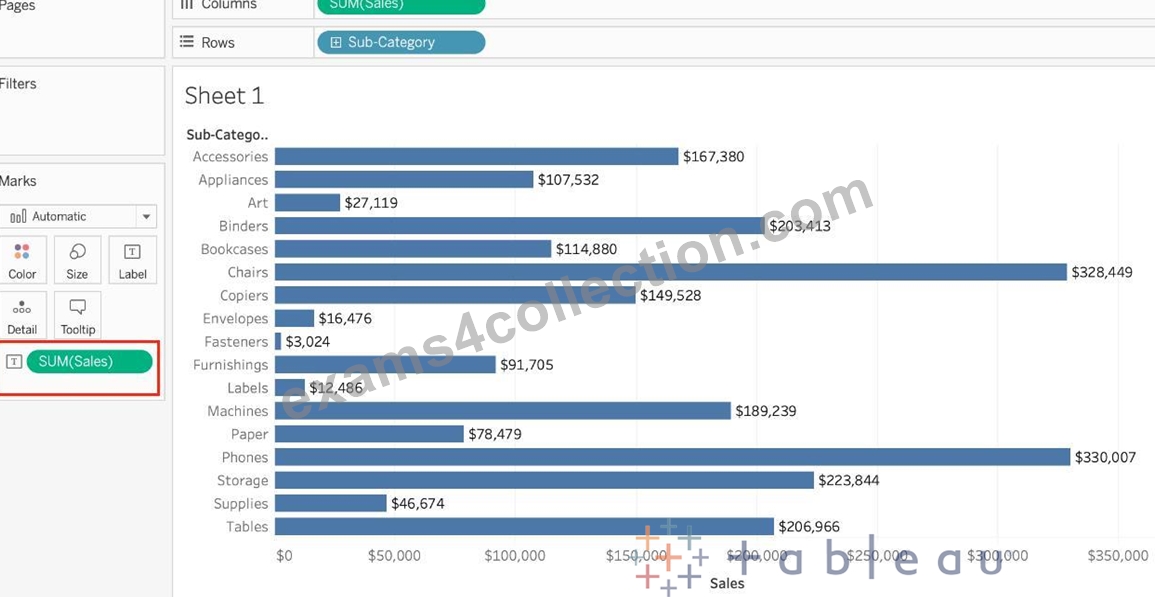
2.2) Drag Sales to the Text icon in the Marks Card:
2.3) Click on Analysis -> Show mark labels from the Tableau menu bar:
NEW QUESTION # 97
You can create _______________ for members in a dimension so that their labels appear differently in the view.
- A. copies
- B. parameters
- C. duplicates
- D. aliases
Answer: D
Explanation:
Explanation
You can create aliases (alternate names) for members in a dimension so that their labels appear differently in the view.
Aliases can be created for the members of discrete dimensions only. They cannot be created for continuous dimensions, dates, or measures.
To create an alias: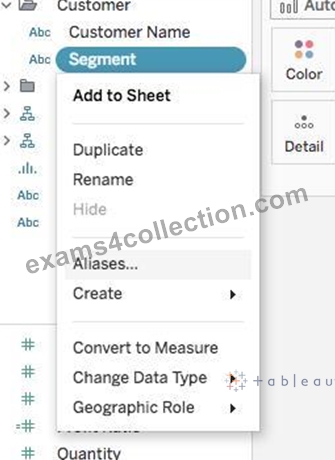
1) In the Data pane, right-click a dimension and select Aliases.
2) In the Edit Aliases dialog box, under Value (Alias), select a member and enter a new name.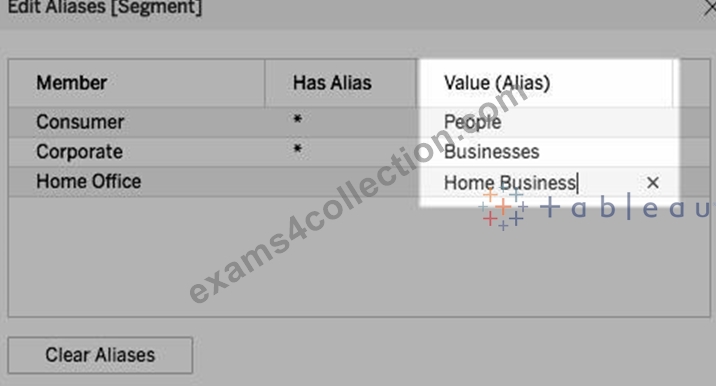
* To submit your changes: In Tableau Desktop, click OK.
On Tableau Server or Tableau Online, click the X icon in the top-right corner of the dialog box.
When you add the field to the view, the alias names appear as labels in the view. For example:
NEW QUESTION # 98
Which of the following is NOT a valid official data source in Tableau Desktop?
- A. SAP HANA
- B. Amazon Redshift
- C. PostgreSQL
- D. Google Firebase
Answer: B
Explanation:
Presently, there is no official way to connect your data in Firebase directly with Tableau Desktop.
A workaround however can be to export your Firebase data into Google BigQuery, and then connect it to Tableau Desktop.
But then again, it is a workaround and not an official out-of-the-box solution.
The following are the available Data sources available as of now:
Server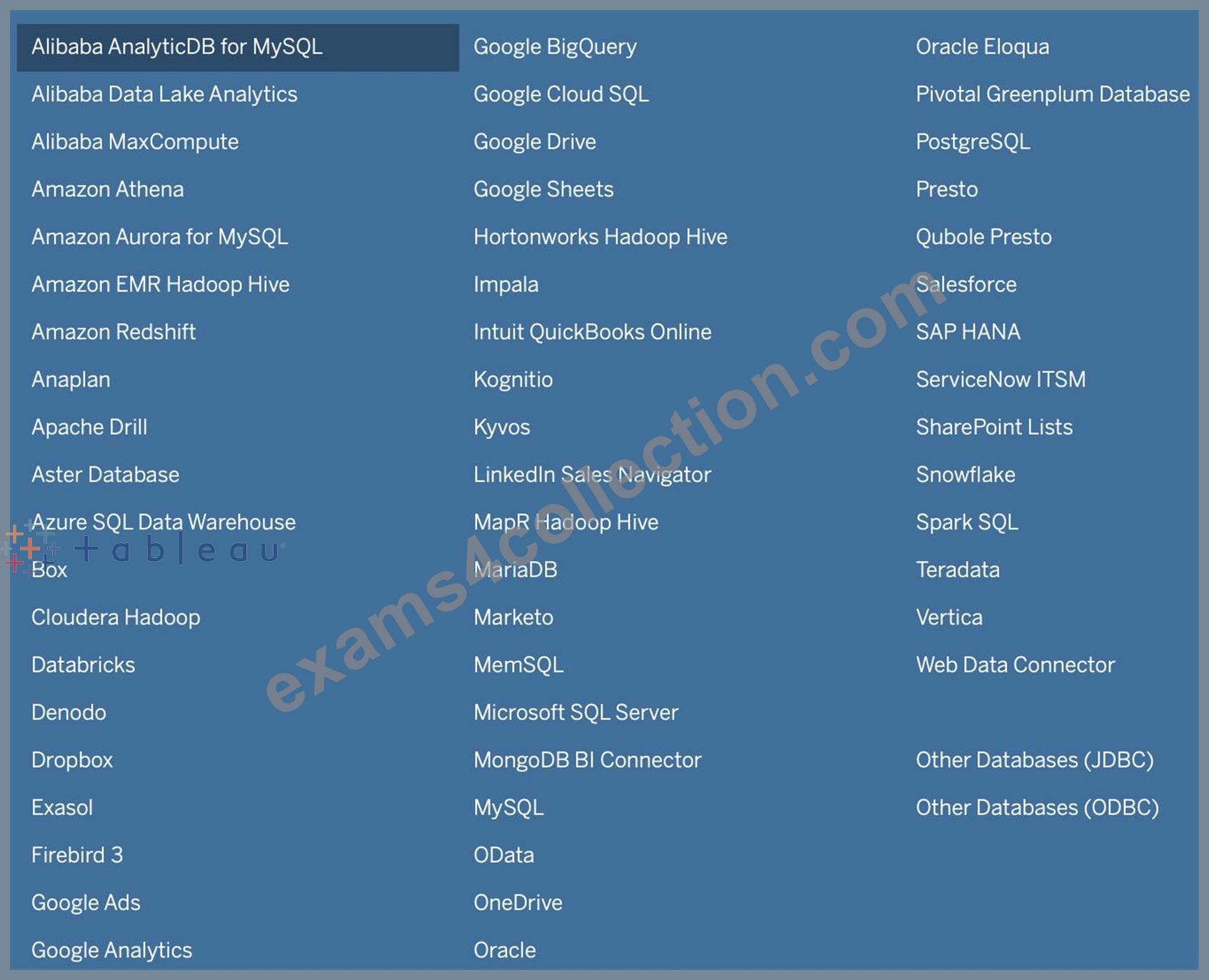
File
NEW QUESTION # 99
We can use ______________ as a static tool to open and interact with packaged workbooks with extracted data sources that have been created in Tableau Desktop.
- A. Tableau Desktop
- B. Tableau Online
- C. Tableau Reader
- D. Tableau Server
Answer: C
Explanation:
The word 'static tool' gives it away.
According to the official website :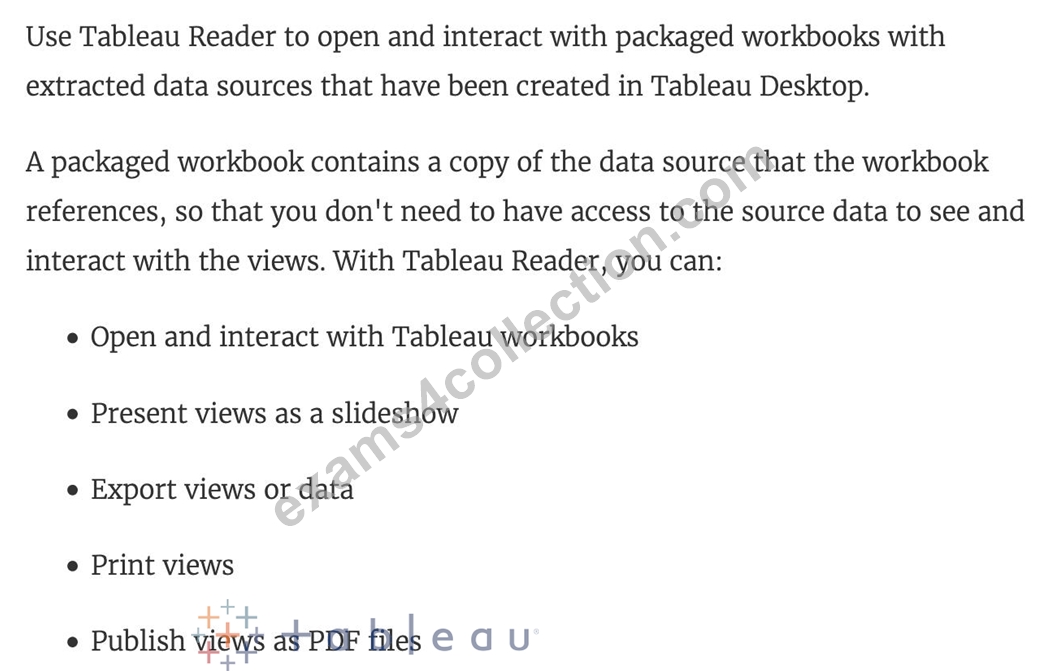
NEW QUESTION # 100
The View Data window displays as much of the data as possible by default, up to _______________ rows.
- A. 10,000
- B. 5,000
- C. 15,000
- D. 20,000
Answer: A
Explanation:
Explanation
The View Data window displays as much of the data as possible by default, up to 10,000 rows. This can be increased though, if you wish to.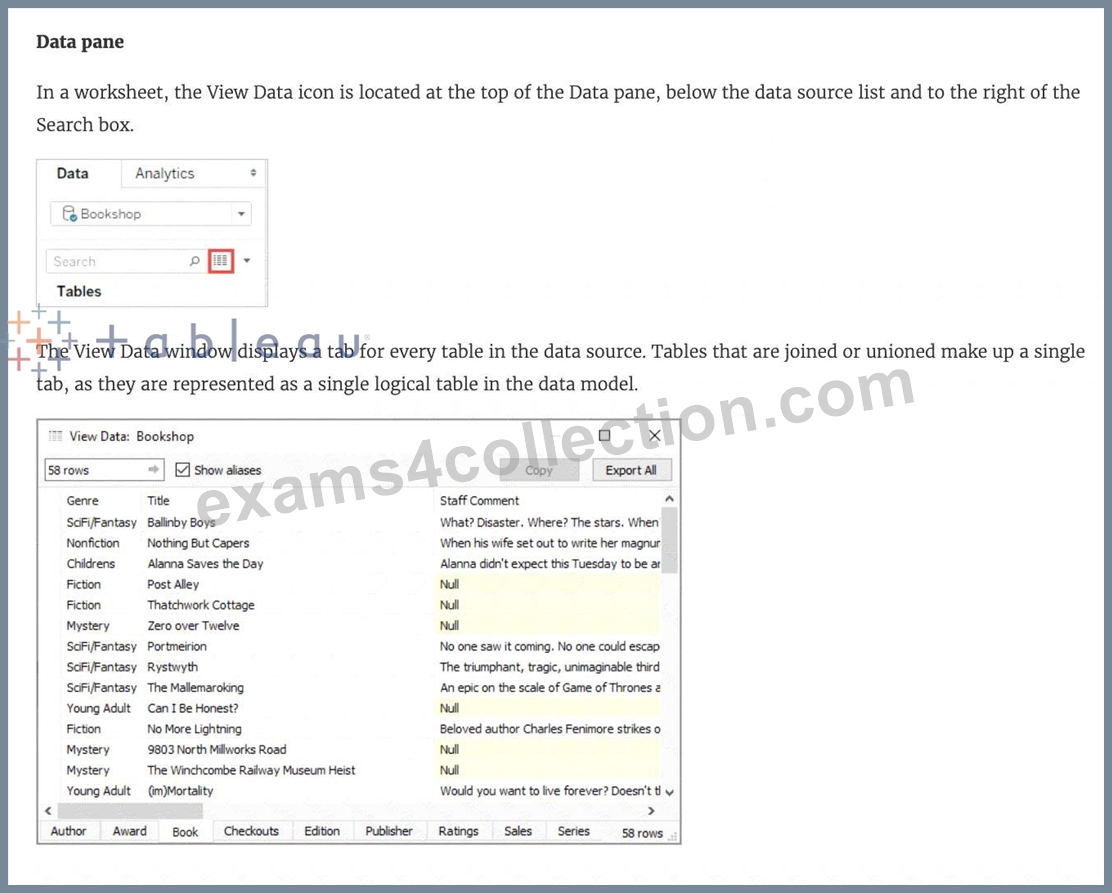
Read more: https://help.tableau.com/current/pro/desktop/en-gb/inspectdata_viewdata.htm
NEW QUESTION # 101
According to Tableau's 'Order of Operations', which of the following filters is applied FIRST?
- A. Extract Filter
- B. Context Filter
- C. Dimension Filter
- D. Measure Filter
Answer: A
Explanation:
Explanation
According to Tableau's order of operations, the Extract filter is right at the top of the hierarchy. The data filtered in the Extract is then passed on to what we see in the Data Pane. See below: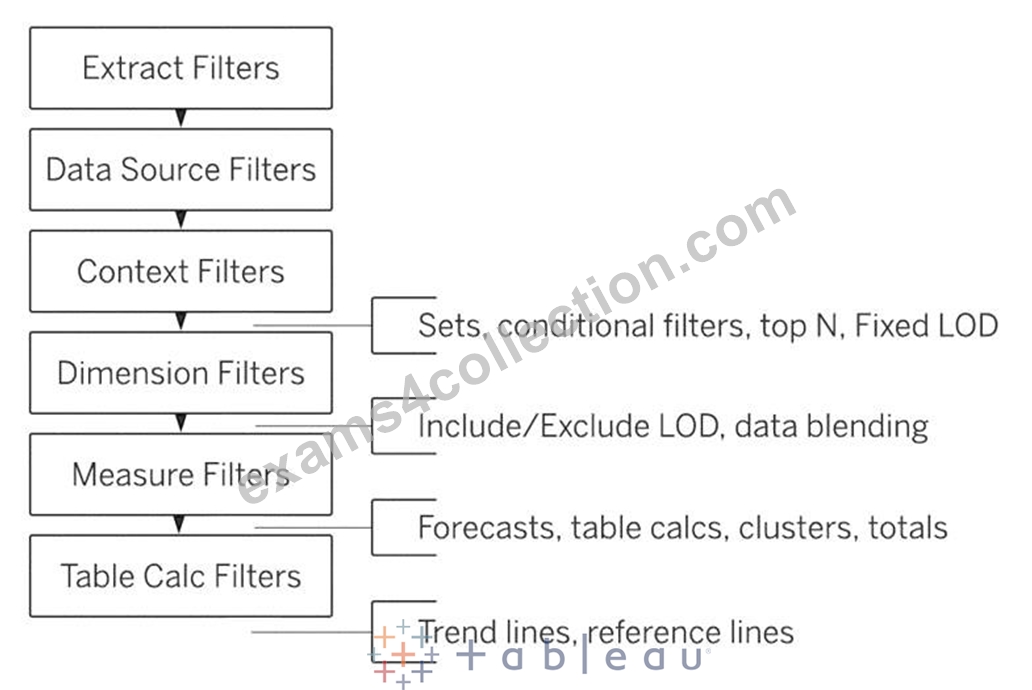
NEW QUESTION # 102
What should you use to apply bold text formatting to rows or columns independent of each other?
- A. The Sheets tab on the Format Font pane
- B. Text on the Marks card
- C. The Field Format Font pane
C The Rows tab or the Columns tab on the Format Font pane
Answer: A
Explanation:
To apply bold text formatting to rows or columns independently in Tableau, you should use the Rows tab or the Columns tab on the Format Font pane. This approach provides control over the formatting of text within individual rows or columns. By selecting the appropriate tab (Rows or Columns), you can apply formatting settings, including bold text, to only the selected rows or columns. This is a crucial feature for enhancing the readability and visual appeal of specific parts of a Tableau worksheet, allowing for emphasis on particular data points or categories.
NEW QUESTION # 103
Which of the following are valid use-cases for the 'Manage Metadata' functionality?
- A. To view all hidden fields
- B. To see the table a field belongs to
- C. To clean and automatically fix the data issues in our data source
- D. To see the field name in the original data source
Answer: A,B,D
Explanation:
Top of Form
To clean and automatically fix the data issues in our data source - This is the definition of Data Interpreter.
To rename the field in the original data source - We never modify the original data source when managing metadata. All changes are local to Tableau for our convenience only.
All other options can be modified using the Manage Metadata property.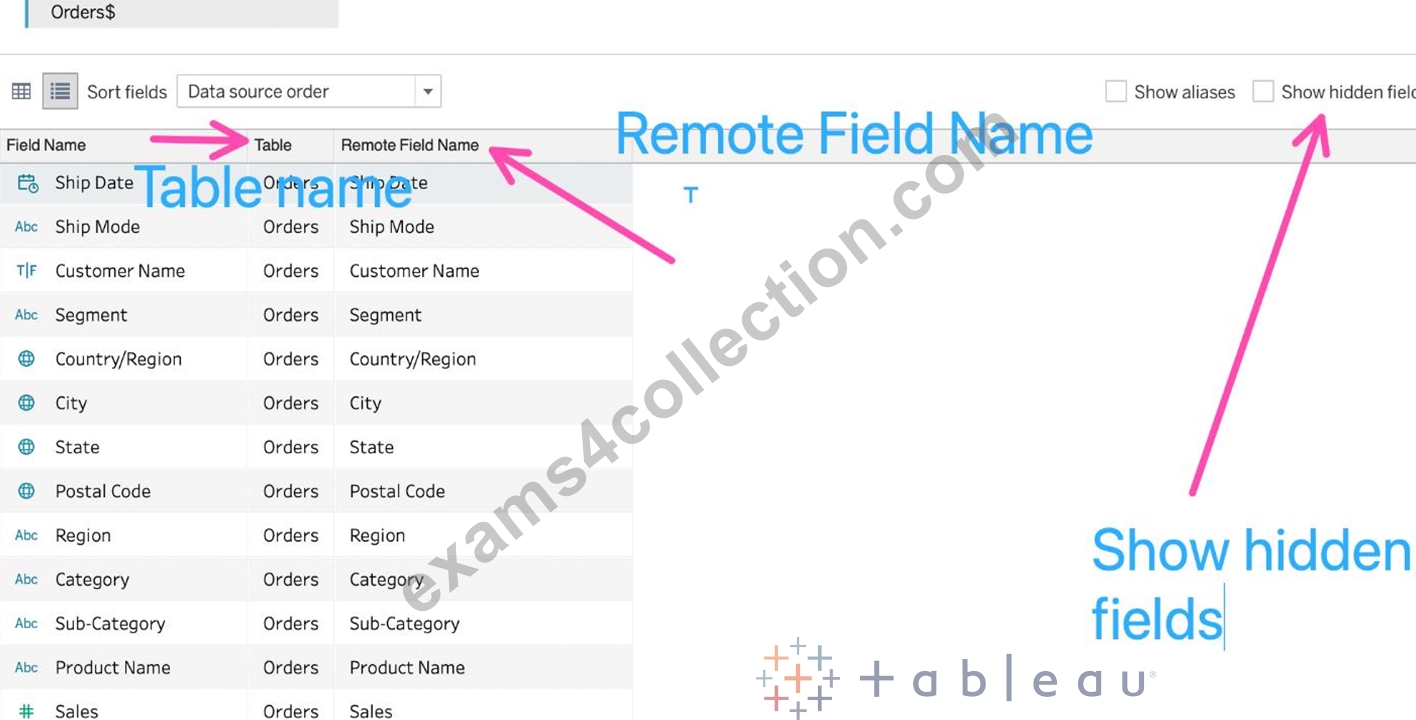
Bottom of Form
NEW QUESTION # 104
By default, measures placed in a view are aggregated. The type of aggregation applied ______________
- A. is always sum
- B. is always COUNT
- C. depends on the context of the view
- D. is always AVERAGE
Answer: C
Explanation:
By default, measures placed in a view are aggregated. Mostly you'll notice that the aggregation is SUM, but not ALWAYS.
The type of aggregation applied varies depending on the context of the view.
NEW QUESTION # 105
Which of the following are compelling reasons to use a Stacked Bar Chart?
- A. To visualize parts of a whole
- B. To be able to visualize complex information with fewer bars /
marks - C. To visualize each discrete category using a separate bar.
- D. To easily visualize trends over time
Answer: A,B
Explanation:
Stacked bar charts will usually have lesser number of bars compared to a normal bar chart:
Normal bar chart - 9 bars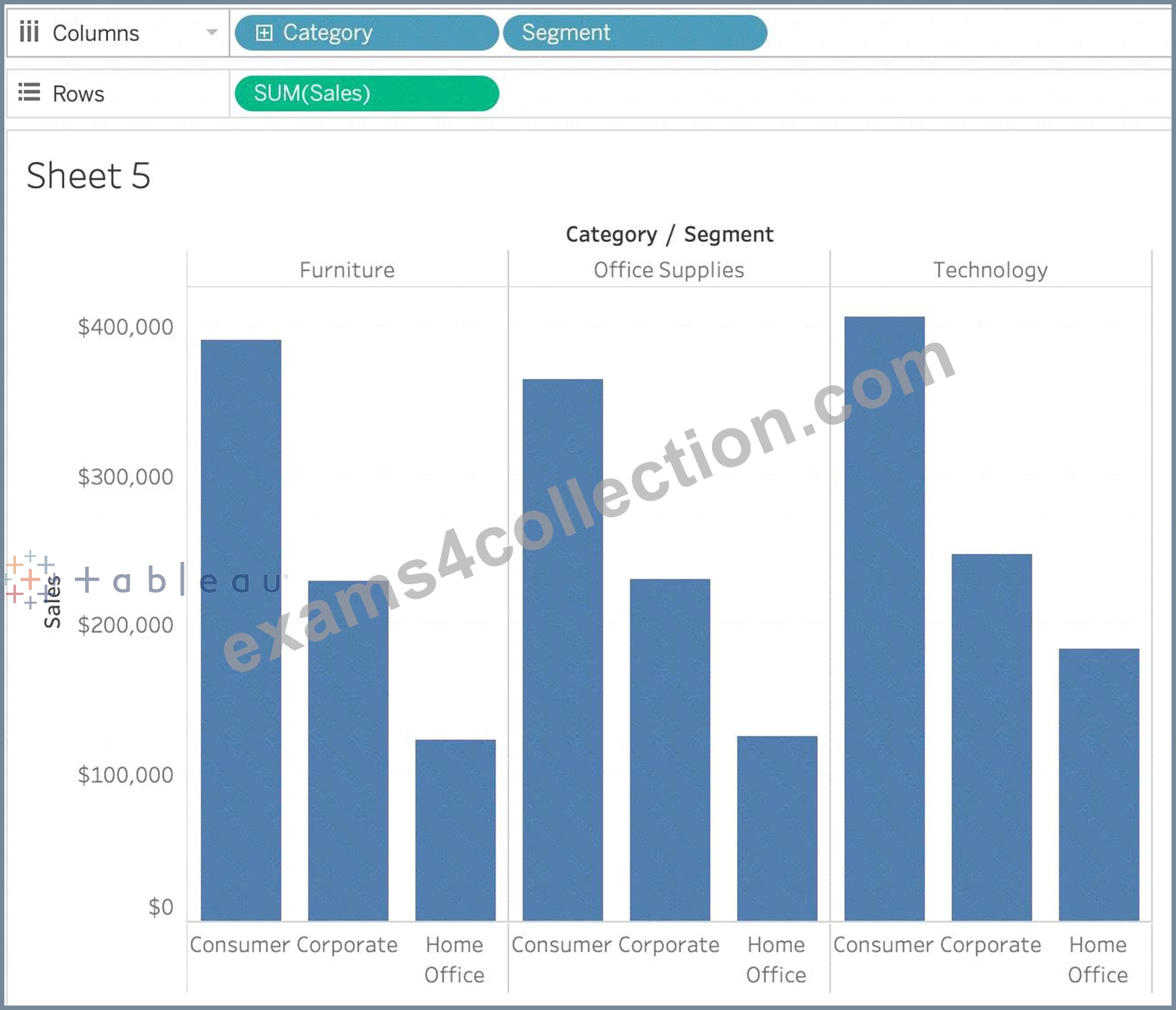
Stacked Bar Chart - 3 bars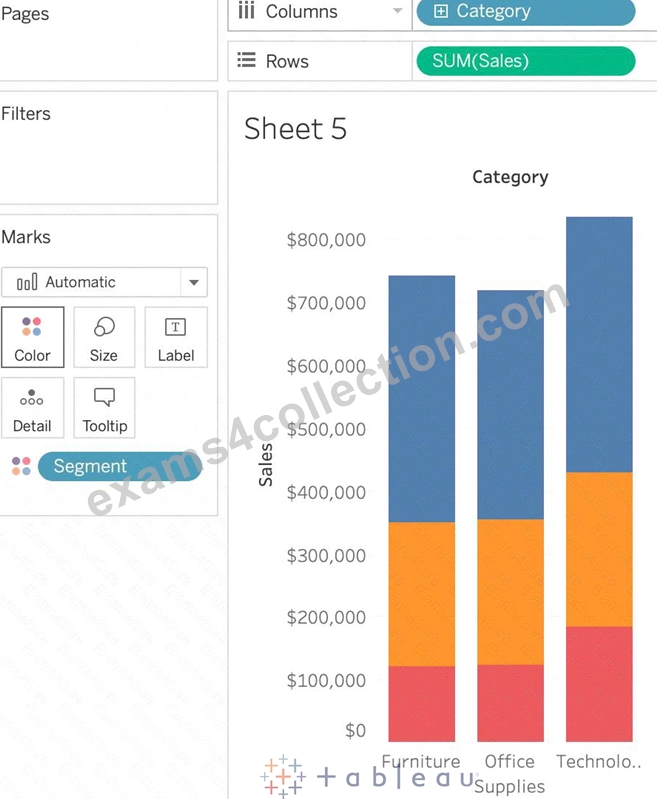
We can easily see a 'part-of-a-whole' methodology being used here as well - we are seeing the breakdown of Segments within each Category.
To easily visualize trends over time - This is the definition of a line chart.
To visualize each discrete category using a separate bar - This can be accomplished using a simple bar chart, why use a stacked one?
NEW QUESTION # 106
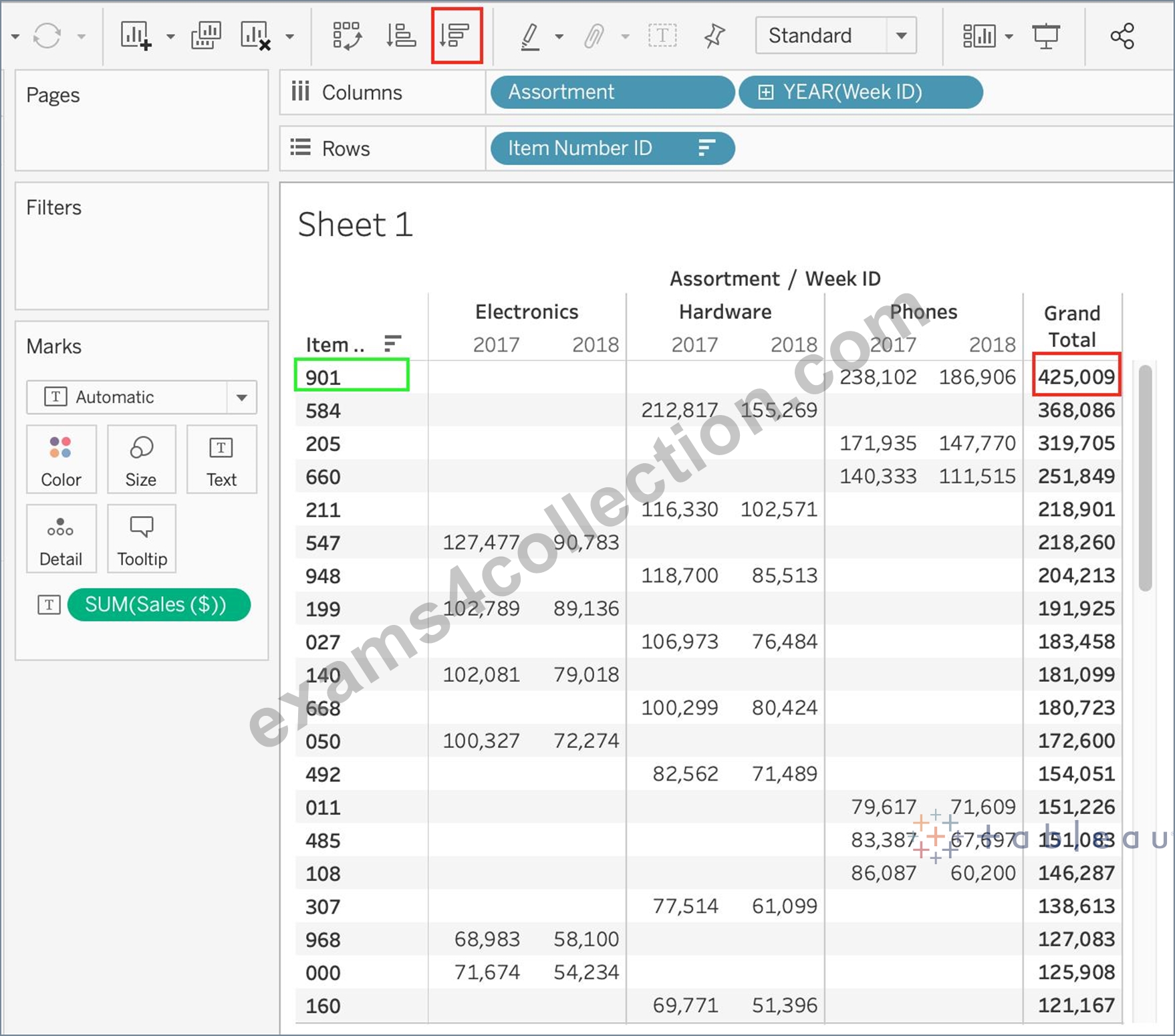
Using the Time-series table, create a cross tab showing the Sales for each Item Number-ID, broken down by Assortments, then add Grand totals to the view. Which Item Number ID made the maximum sales across all assortments?
- A. 0
- B. 1
- C. 2
- D. Correct)
- E. 3
Answer: B
Explanation:
Follow along the steps below:
Drag Assortment and Year ID to the column shelf, and Item Number ID to the row shelf. Next, drag Sales to the Text label to create a cross-tab as below: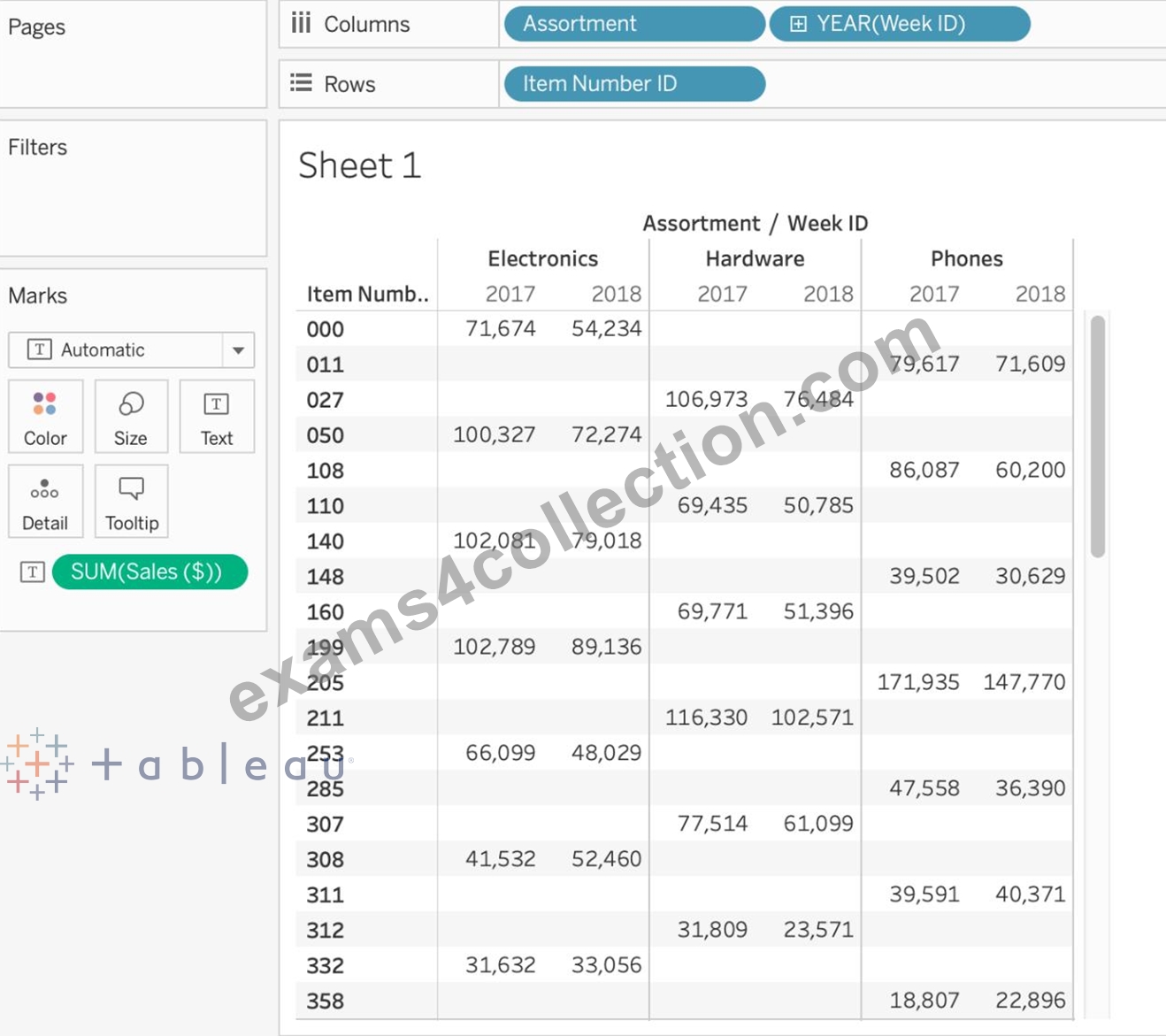
NEW QUESTION # 107
To display data that has both negative and positive quantitative values, Tableau Desktop will display marks by using__________________as the default.
- A. a sequential palette
- B. a categorical palette
- C. the full color range
- D. a diverging palette
Answer: D
Explanation:
Tableau Desktop will display marks by using a diverging palette as the default to display data that has both negative and positive quantitative values. A diverging palette is a type of color palette that uses two different color ranges to show positive and negative values. For example, a red-green diverging palette uses shades of red for negative values and shades of green for positive values. A diverging palette is automatically applied when there are both negative and positive values for a measure that is placed on Color on the Marks card5 The other options are not correct types of color palettes that Tableau Desktop uses as the default for data with both negative and positive values. A full color range is not a valid term for a color palette in Tableau. A sequential palette is a type of color palette that uses different shades of one color to show variations in a single measure. A sequential palette is usually applied when there are only positive values for a measure that is placed on Color on the Marks card5 A categorical palette is a type of color palette that uses different colors to show discrete values or categories. A categorical palette is usually applied when there is a dimension that is placed on Color on the Marks card5
NEW QUESTION # 108
True or False: Trend lines can only be used with numeric or date fields
- A. True
- B. False
Answer: B
Explanation:
Explanation
You can show trend lines in a visualization to highlight trends in your data.
To add trend lines to a view, both axes must contain a field that can be interpreted as a number. For example, you cannot add a trend line to a view that has the Product Category dimension, which contains strings, on the Columns shelf and the Profit measure on the Rows shelf.
However, you can add a trend line to a view of sales over time because both sales and time can be interpreted as numeric values.
NEW QUESTION # 109
Which of the following is NOT a valid official data source in Tableau Desktop?
- A. Amazon Redshift
- B. SAP HANA
- C. Google Firebase
- D. PostgreSQL
Answer: C
Explanation:
Presently, there is no official way to connect your data in Firebase directly with Tableau Desktop.
A workaround however can be to export your Firebase data into Google BigQuery, and then connect it to Tableau Desktop.
But then again, it is a workaround and not an official out-of-the-box solution.
The following are the available Data sources available as of now:
1) Server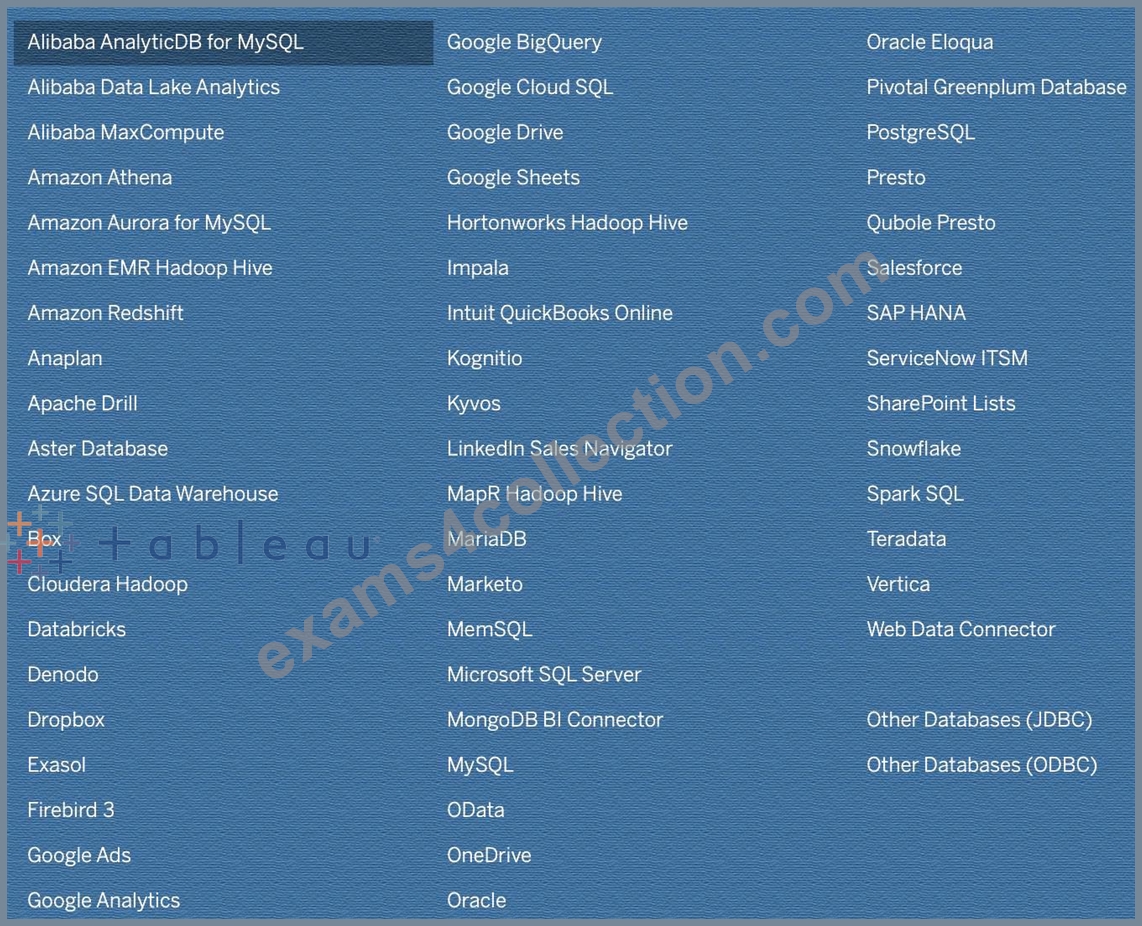
2) File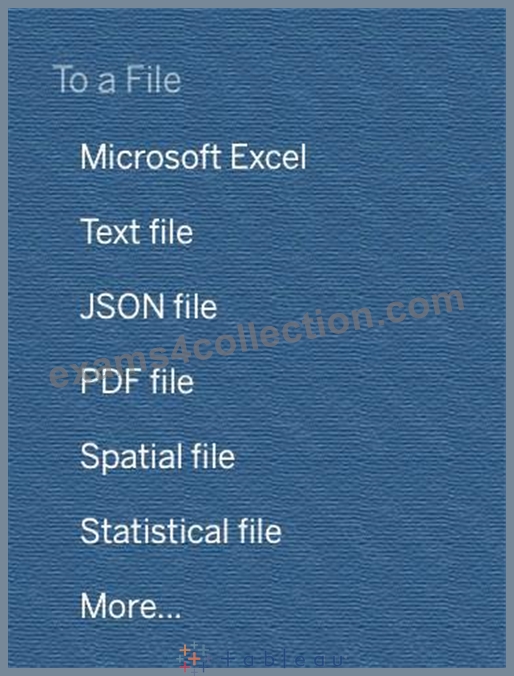
NEW QUESTION # 110
What will the following function return?
LEFT("Tableau", 3)
- A. eau
- B. An error
- C. ble
- D. Tab
Answer: D
Explanation:
Explanation
The following is the official documentation for the String function LEFT:
NEW QUESTION # 111
Using the dataset provided, create a crosstab showing the Profit of each Region per Year, then add grand totals to the view. What was the total Profit for Canada in 2012 and the total Profit for Canada for 2011 through
2014, respectively?
- A. 5,129 and 88,872
- B. 1,807 and 34,571
- C. 52,678 and 311,404
- D. 4,888 and 17,817
Answer: D
Explanation:
To reach the correct answer, follow these steps:
1) Drag Order Date (Discrete Year) to the Column shelf, and Region to the Row Shelf as shown: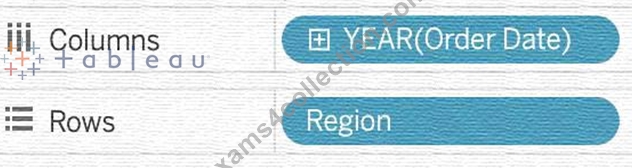
2) Drag Profit to Text in the Marks Shelf as shown: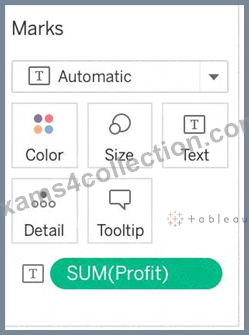
3) Click on Analysis as shown -> Totals -> SELECT ROW GRAND TOTALS
The following will be the final view: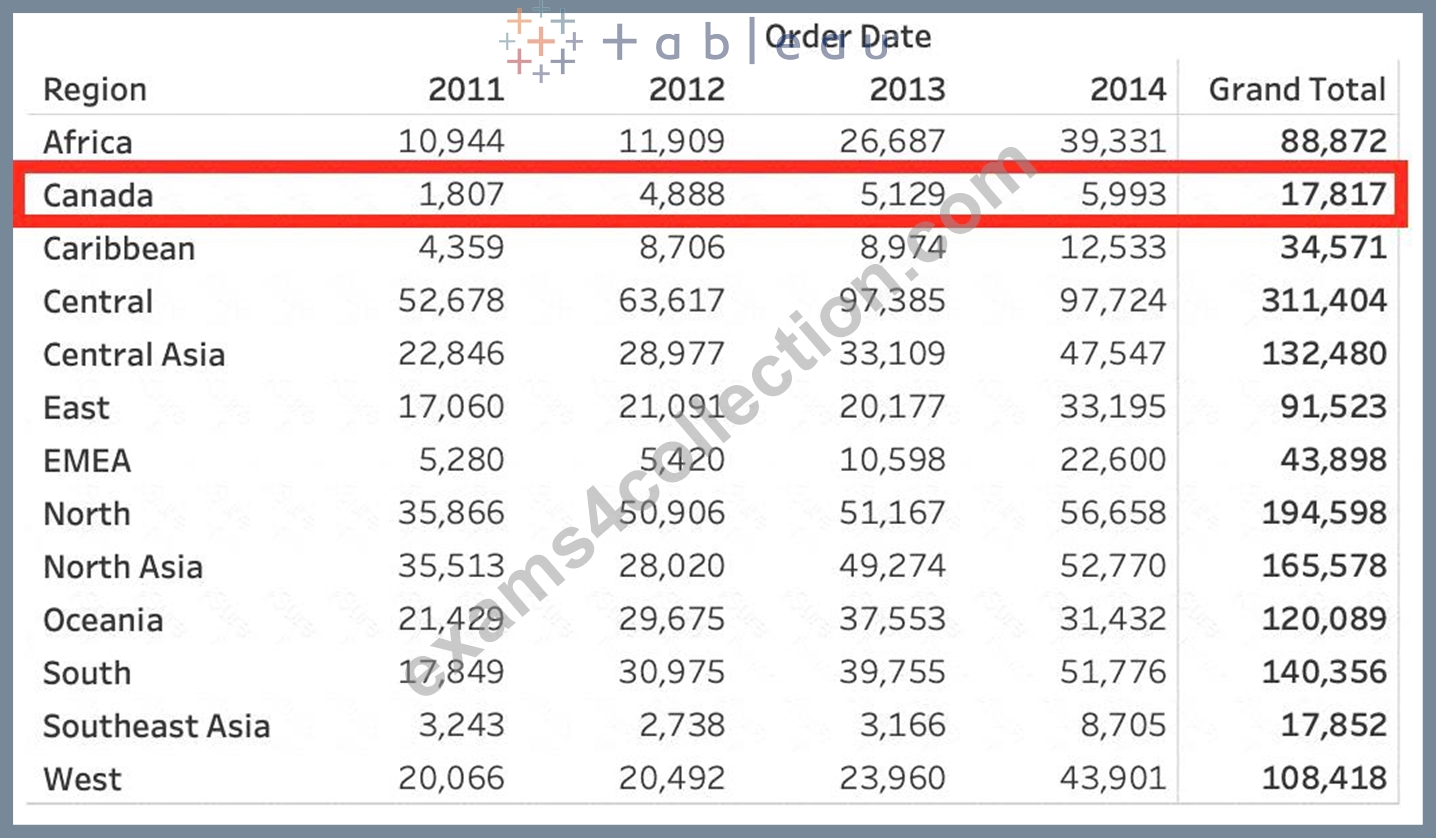
You could also Filter by Region to only Focus on Canada, but that's your choice: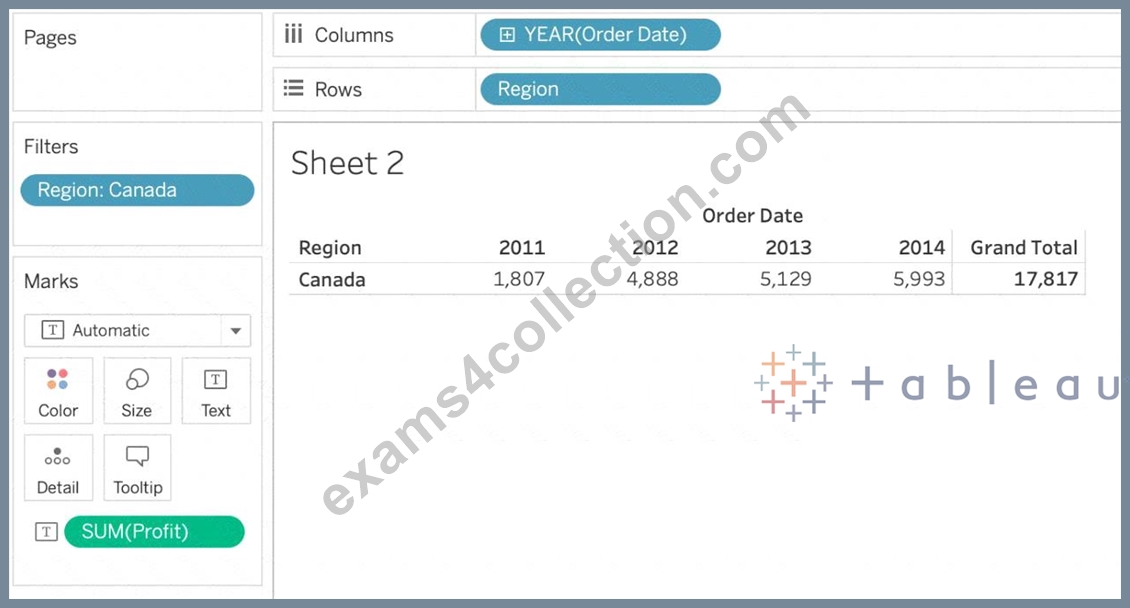
THEREFORE,
2012 = 4,888
2011 -> 2014 = 17,817
NEW QUESTION # 112
To customize links based on the data in your dashboard, you can automatically enter field values as _______________ in URLs
- A. parameters
- B. inputs
- C. values
- D. sets
Answer: A
Explanation:
A URL action is a hyperlink that points to a web page, file, or other web-based resource outside of Tableau. You can use URL actions to create an email or link to additional information about your data. To customize links based on your data, you can automatically enter field values as parameters in URLs.
Read more in depth at : https://help.tableau.com/current/pro/desktop/en-us/actions_url.htm
NEW QUESTION # 113
______________ is a method for appending values (rows) to tables. You can use this method if both tables have the same columns. The result is a virtual table that has the same columns but extends vertically by adding rows of data.
- A. Combining
- B. Unioning
- C. Blending
- D. Joining
Answer: B
Explanation:
Unioning is the correct answer!
From the official documentation: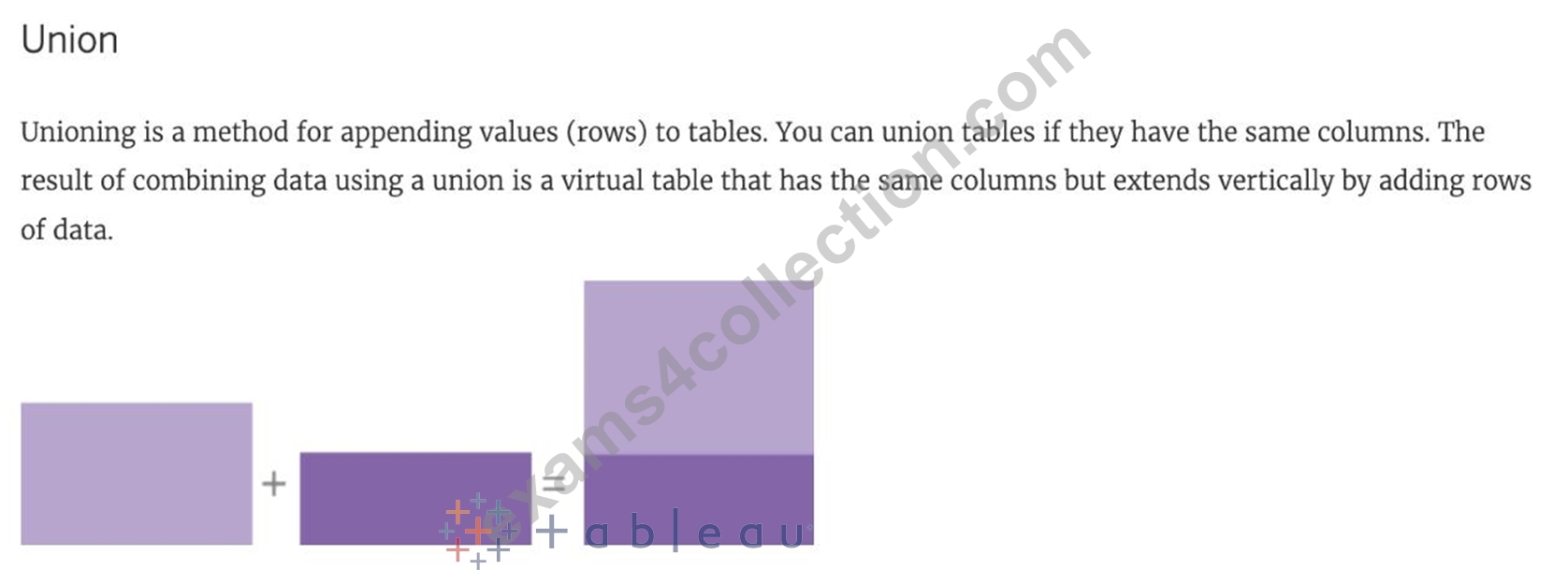
For example, suppose you have the following customer purchase information stored in three tables, separated by month. The table names are "May2016" , "June2016" and "July2016."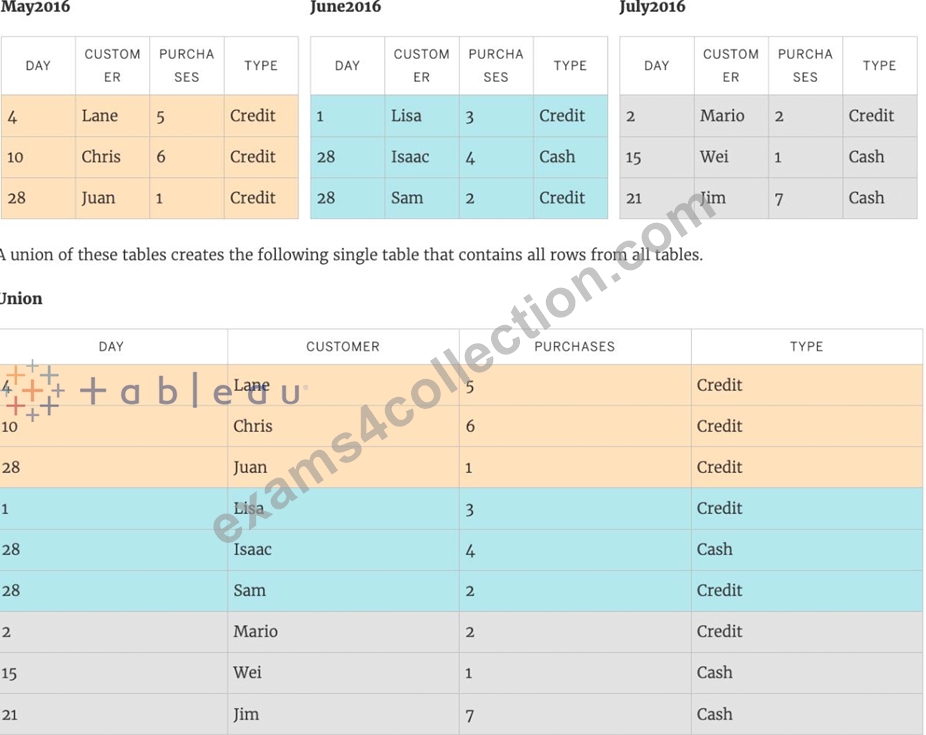
NEW QUESTION # 114
True or False: We get different colour pallete options if we drop a discrete field on "Color" in the marks card compared to if we drop a continous field on Color.
- A. False
- B. True
Answer: B
Explanation:
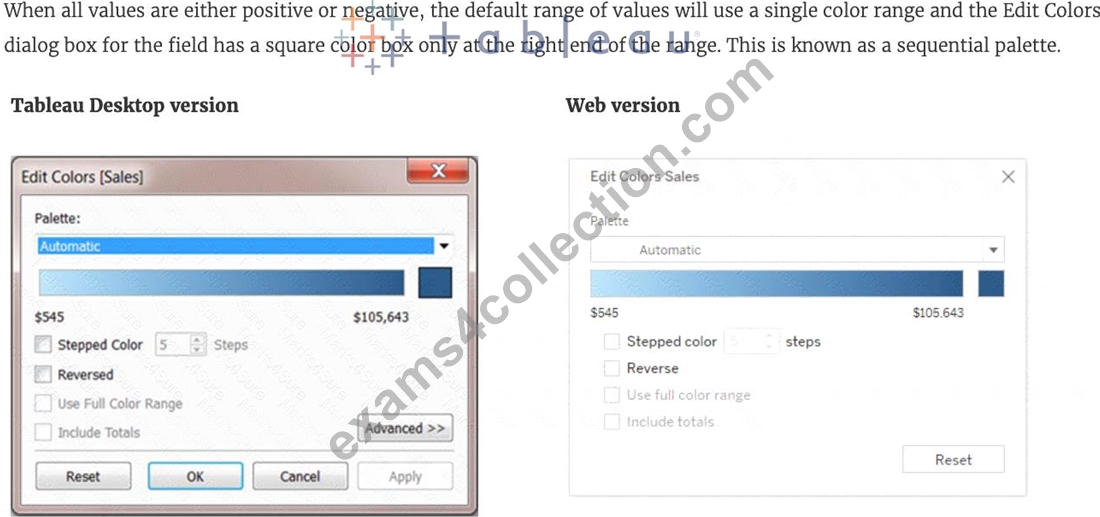
Yes! We get different color palettes. They are:
*From the official Tableau documentation*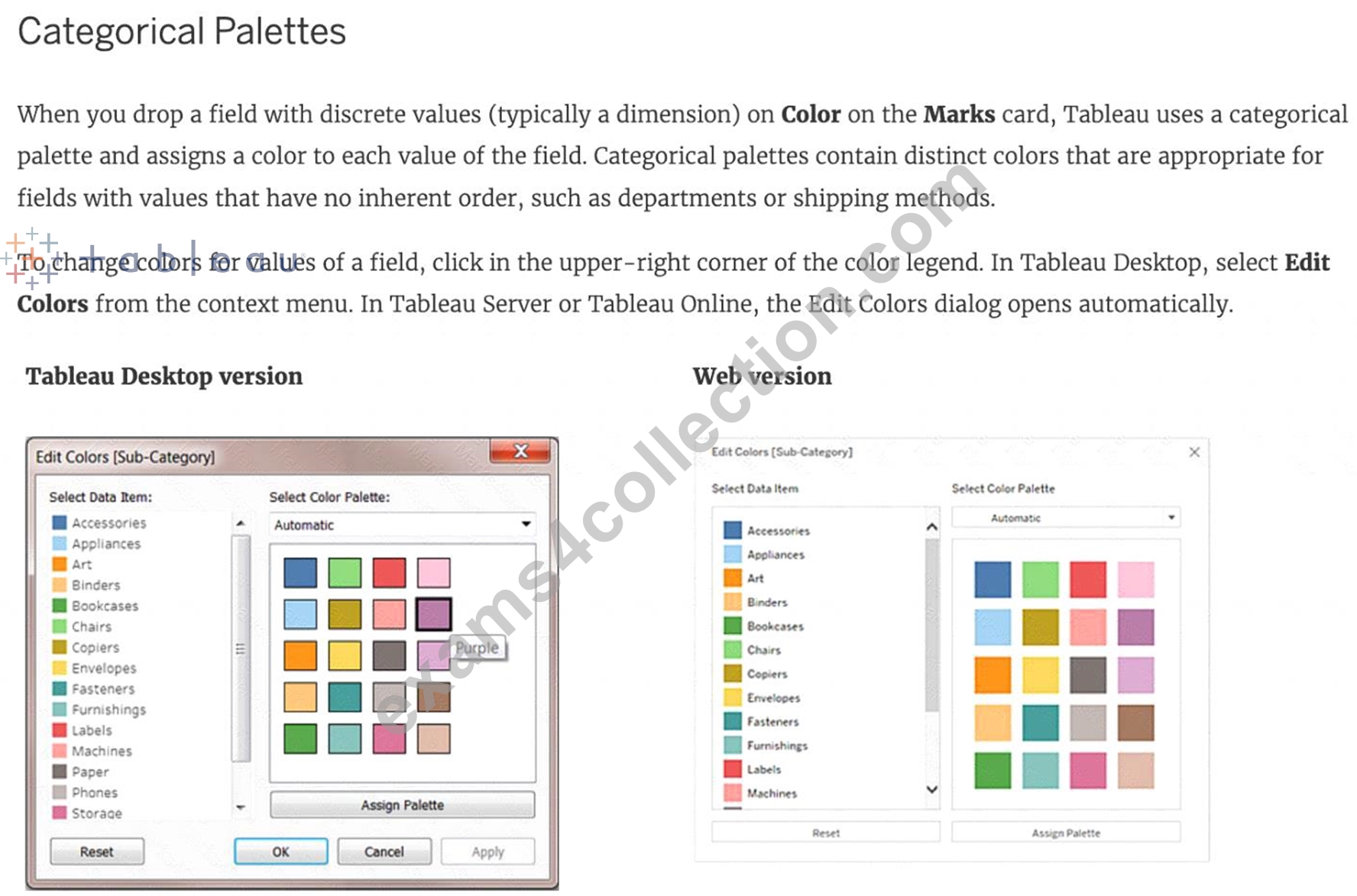
To change the color for a value
1) Click on an item on the left, under Select Data Item.
2) Click a new color in the palette on the right. In Tableau Desktop you can hover over a swatch to identify the color.
3) Repeat for as many values that you want to change.
4) In Tableau Desktop, click OK to exit the Edit Colors dialog box. In Tableau Server or Tableau Online, simply close the dialog box.
AND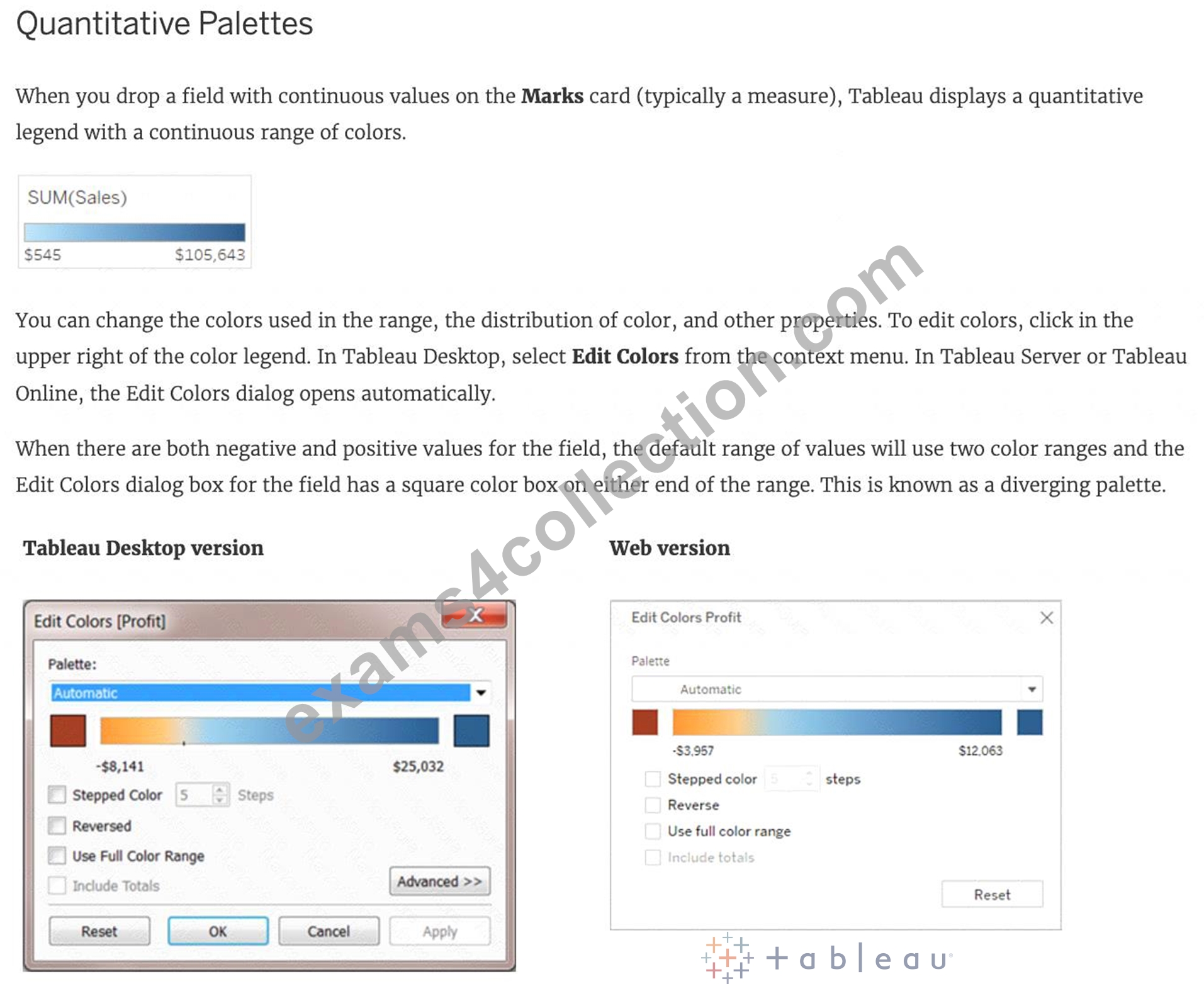
NEW QUESTION # 115
Which of the following is true about 'Incremental refresh' when creating Extracts in Tableau?
- A. There is no difference, both are the same when using extracts. They are different when using live connections.
- B. It only adds rows that are new since the previous refresh.
- C. They can only be used with large datasets
- D. It replaces all of the contents in the extract
Answer: B
Explanation:
Extracts are saved subsets of data that you can use to improve performance or to take advantage of Tableau functionality not available or supported in your original data. When you create an extract of your data, you can reduce the total amount of data by using filters and configuring other limits. After you create an extract, you can refresh it with data from the original data.
When refreshing the data, you have the option to either do a full refresh, which replaces all of the contents in the extract, or you can do an incremental refresh, which only adds rows that are new since the previous refresh.
NEW QUESTION # 116
Tableau will automatically create a hierarchy for which two kinds of data? Choose two.
- A. Geographic
- B. Date
- C. String
- D. Date & Time
Answer: C,D
Explanation:
Tableau will automatically create a hierarchy for date and geographic data. A hierarchy is a way of organizing data into different levels of detail. For example, a date hierarchy can have year, quarter, month, and day levels.
A geographic hierarchy can have country, state, city, and zip code levels. Tableau recognizes date and geographic data based on their data types and formats, and creates hierarchies for them by default. Tableau does not automatically create hierarchies for date & time or string data3
NEW QUESTION # 117
......
Tableau is a popular data visualization tool that allows users to create interactive and meaningful visualizations from their data. The Tableau Desktop Specialist Certification Exam, also known as the TDS-C01, is an exam designed to test a user's proficiency in using Tableau Desktop. Tableau Desktop Specialist certification is ideal for individuals who want to demonstrate their expertise in using Tableau and to validate their skills, knowledge, and ability to use the tool effectively.
The benefits of obtaining the Tableau TDS-C01 Certification are numerous. It validates the candidate's knowledge and skills in Tableau Desktop, making them more attractive to potential employers. It also enhances the candidate's professional credibility and demonstrates their commitment to ongoing professional development. Additionally, certified individuals may have access to exclusive job opportunities and higher salaries.
Exam Questions for TDS-C01 Updated Versions With Test Engine: https://easytest.exams4collection.com/TDS-C01-latest-braindumps.html
